
The Streamlit Theming Method That Changes Everything
The surprisingly simple method that makes your Streamlit apps look uniquely yours

You know that moment when you finish building an amazing Streamlit app – the data flows perfectly, the insights are spot-on, the functionality is exactly what your team needs – and then you step back and think: "Well, this looks exactly like every other Streamlit app I've ever seen."
That telltale Streamlit aesthetic. The default theme, the predictable layout, the unmistakable "I was built with Streamlit" signature that's immediately recognizable to anyone who's spent time in the Python ecosystem.
Don't get me wrong – Streamlit apps work beautifully. I've built several for clients and internal teams, and they deliver real business value. But that visual sameness always bothered me. Every app had that identical look, no matter how sophisticated the analysis underneath.
Then I discovered something that changes everything.
The Sameness Problem We All Accepted
For years, we just accepted it. Streamlit apps looked like Streamlit apps. Sure, you could inject some custom CSS here and there, but it was hacky, fragile, and honestly more trouble than it was worth for most projects.
The challenge wasn't functionality – it was differentiation. When every app shares the same visual DNA, it's harder to create something that feels uniquely yours or matches your brand identity.
What Streamlit Quietly Built (And Why It's Genius)
While we were all complaining about themes, the Streamlit team was building something elegant. They didn't just add custom CSS support or a theme builder interface. They did something much smarter.
They built a complete font and theming system that works through simple configuration files.
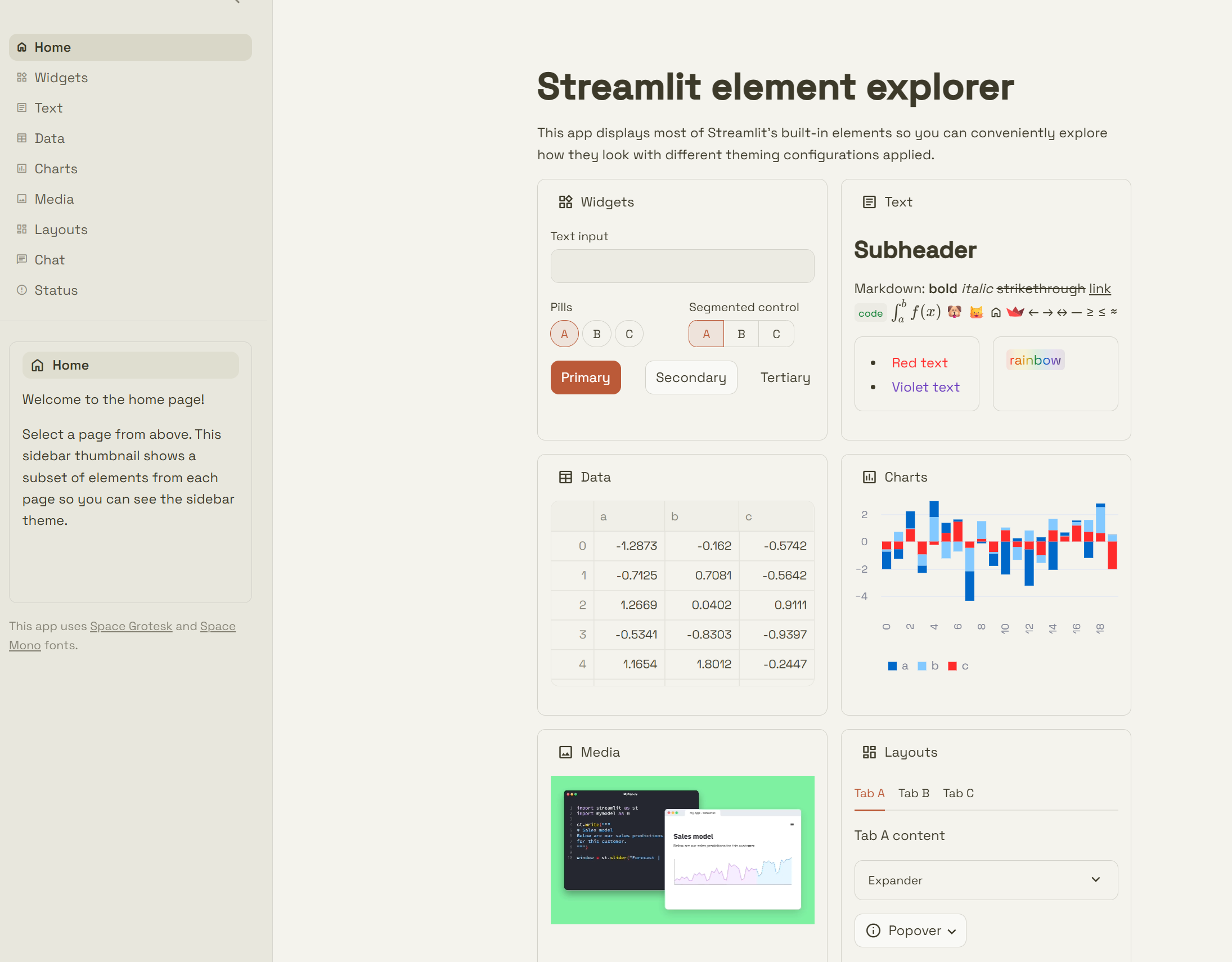
🔗 Here's the repository that opened my eyes to what's possible – clone it and prepare to have your mind blown.
The Beautiful Simplicity (This Is The Secret)
Want to know the real secret behind professional-looking Streamlit apps? It's not complex CSS. It's not JavaScript injection. It's two things:
A
config.tomlfile in your.streamlitdirectoryFont files in a
staticdirectory
That's it. Seriously.
When I cloned that Anthropic-inspired repository and started poking around, I couldn't believe how straightforward it was. Here's the entire configuration that creates that gorgeous theme:
[server]
enableStaticServing = true  # This lets Streamlit serve your custom fonts

# Define your custom font families
[[theme.fontFaces]]
family = "SpaceGrotesk"  # Main body font - clean, modern sans-serif
url = "app/static/SpaceGrotesk-VariableFont_wght.ttf"

[[theme.fontFaces]]
family = "SpaceGroteskHeader"  # Headers get their own weight
url = "app/static/SpaceGrotesk-SemiBold.ttf"

[[theme.fontFaces]]
family = "SpaceMono"  # Code font - monospace for readability
url = "app/static/SpaceMono-Bold.ttf"
style = "normal"
weight = 700

[[theme.fontFaces]]
family = "SpaceMono"
url = "app/static/SpaceMono-BoldItalic.ttf"
style = "italic"
weight = 700

[[theme.fontFaces]]
family = "SpaceMono"
url = "app/static/SpaceMono-Italic.ttf"
style = "italic"
weight = 400

[[theme.fontFaces]]
family = "SpaceMono"
url = "app/static/SpaceMono-Regular.ttf"
style = "normal"
weight = 400

[theme]
primaryColor = "#bb5a38"           # Warm, professional accent color
backgroundColor = "#f4f3ed"        # Soft cream background - easy on the eyes
secondaryBackgroundColor = "#ecebe3"  # Subtle contrast for cards/sections
textColor = "#3d3a2a"             # Dark brown - readable but not harsh black
linkColor = "#3d3a2a"             # Keep links consistent with text
borderColor = "#d3d2ca"           # Gentle borders that define
showWidgetBorder = true           # Clean widget definition
baseRadius = "0.6rem"             # Subtle rounded corners - modern feel
font = "SpaceGrotesk"             # Apply your custom font to body text
headingFont = "SpaceGroteskHeader" # Headers get the semibold treatment
codeFont = "SpaceMono"            # Monospace for code blocks
codeBackgroundColor = "#ecebe4"   # Code gets subtle background highlight
showSidebarBorder = true          # Clean sidebar separation

[theme.sidebar]
backgroundColor = "#e8e7dd"        # Sidebar slightly darker than main
secondaryBackgroundColor = "#ecebe3"
The Method That Changes Everything
Here's what makes this approach brilliant:
1. Font Discovery Made Easy Head over to Google Fonts and browse thousands of font combinations. Find something that matches your brand or client aesthetic. Download the font files.
2. Static Directory Setup Create a /
staticdirectory in your Streamlit project root. Drop your font files there. That's your font library.3. Configuration Magic Define your fonts in the
config.tomlfile and assign them to different text elements. Streamlit handles all the CSS magic behind the scenes.4. Color Palette Coordination Choose a color palette that works with your fonts. The Anthropic theme uses warm, earthy tones that feel premium without being flashy.
What This Actually Means for Your Work
I've been experimenting with this approach for days now, and the results are striking. The same data dashboard that looked like a prototype last month now looks like a professionally designed business application.
The Python development workflow stays exactly the same. You're still writing the same Streamlit code. But the output looks intentionally designed rather than accidentally functional.
The Opportunity Right in Front of Us
Here's what excites me most about this: we're at the beginning of something bigger. Streamlit has given us the infrastructure to create genuinely professional applications without sacrificing the rapid development cycle we love.
I'm building a library of themes using this method – corporate professional, data science focused, marketing dashboard styled, technical documentation themed. Each one takes minutes to configure but transforms the entire feel of an application. (Heck, you can even go full cyberpunk retro if that's your vibe!)
🚀 Clone the Anthropic-inspired repository and see for yourself. Play with the fonts, adjust the colors, make it yours.
The era of "obviously Streamlit" apps is over. The tools are here. The method is simple.
Time to build something that looks as professional as the insights it delivers.
What themes are you planning to experiment with? I'd love to see what you create with this approach – drop me a line on LinkedIn and let's compare notes.
Nice! I'm working on a custom Agent Development Kit solution but am no frontend engineer so I wanted a really easy UI layer, yet am super picky about aesthetics even if I have no idea how to execute my taste, haha. This looks like a really good balance, cheers!
That is a really helpful intro into the topic.
For all people how want to interactively try theming configs you can also check st_yled studio, hosted on the Streamlit Community could, which lets you pre-configure and test themings and export them to you apps.
https://styled-studio.streamlit.app/